Coding Architecture II: FS26
Week 04 - Attractor Points & Object-Oriented Modifiers
Table of Contents
- Introduction
- Review: Assignment 01
- Attractor Points: Scaling
- Attractors as Forces
- Mesh Relaxation
- Object-Oriented Modifiers
- Assignment A02
- Slides
- Examples
Introduction
This week, we bridge the gap between simple geometric transformations and complex iterative systems. We start by reviewing the logic behind Assignment 01 (Brep Meshing & RF Systems). We then explore the concept of Attractors- first as a tool for local geometric scaling, and then as a dynamic “force” within our mesh relaxation system. Finally, we will refactor our procedural code into an Object-Oriented structure using “Modifier” classes, setting the stage for the modular relaxer in Assignment A02.
Review: Assignment 01
We will discuss the solutions for the Brep Mesher and the Reciprocal Frame (RF) system.
- UV Mapping: How to reliably sample a Brep.
- Topology: Ensuring the mesh connectivity correctly represents the RF logic.
- Timber Integration: Translating abstract edge attributes into
compas_timberbeams and joints.
Attractor Points: Scaling
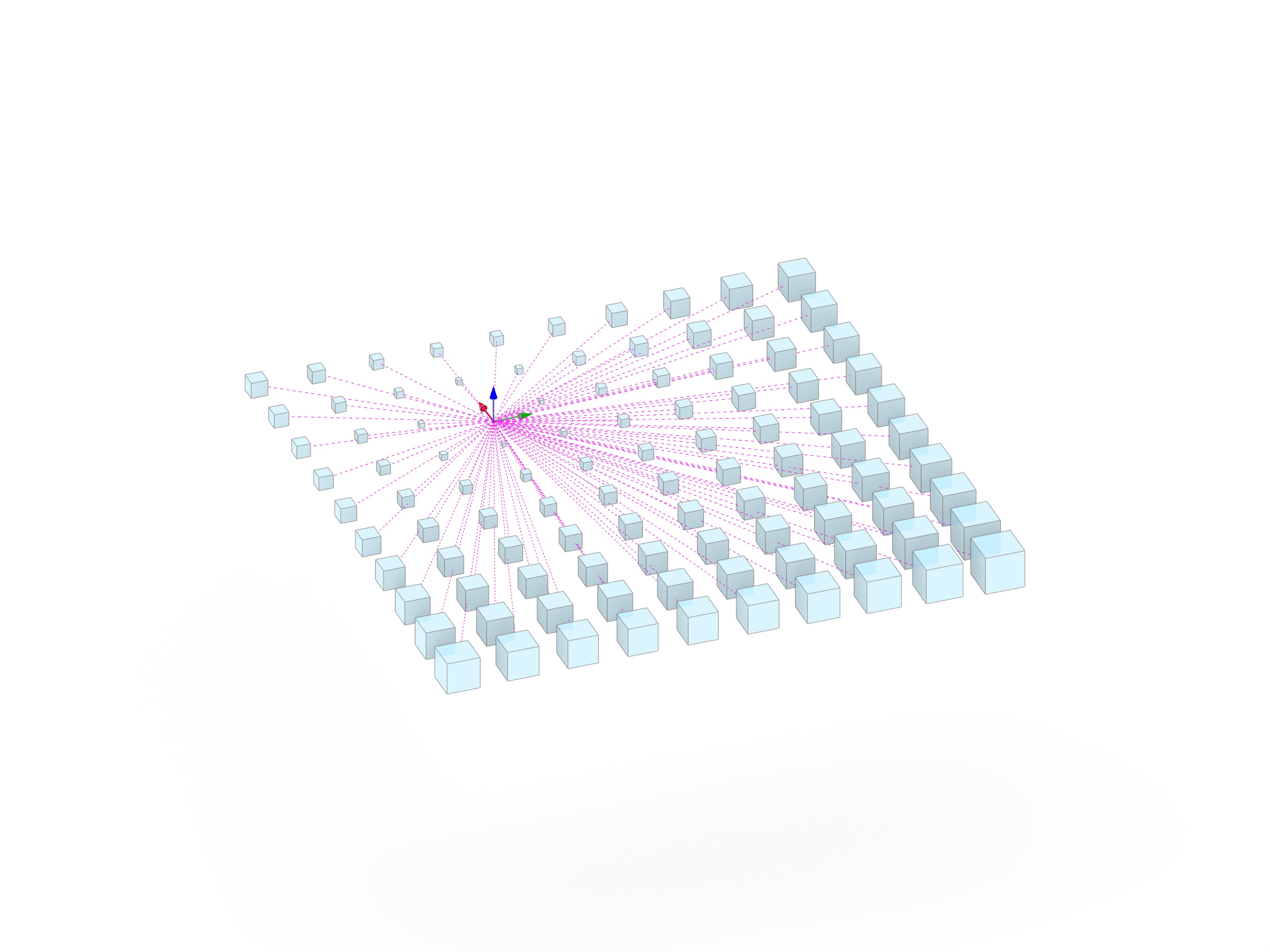
Before using attractors in complex simulations, we look at the simplest case: Distance-based Scaling.
- Calculating the distance between a grid of boxes and one or more attractor points.
- Mapping that distance to a scale factor.
- Using
compas.geometryto transform geometry relative to its proximity to an influence source.
Attractors as Forces
Building on last week’s Mesh Relaxation, we introduce a new type of influence: the Attractor Force. Instead of just internal edge forces, we add an external vector that pulls mesh vertices toward a point (or pushes away from said point). This allows for “sculpting” the relaxed form by placing attractors in space.
Mesh Relaxation
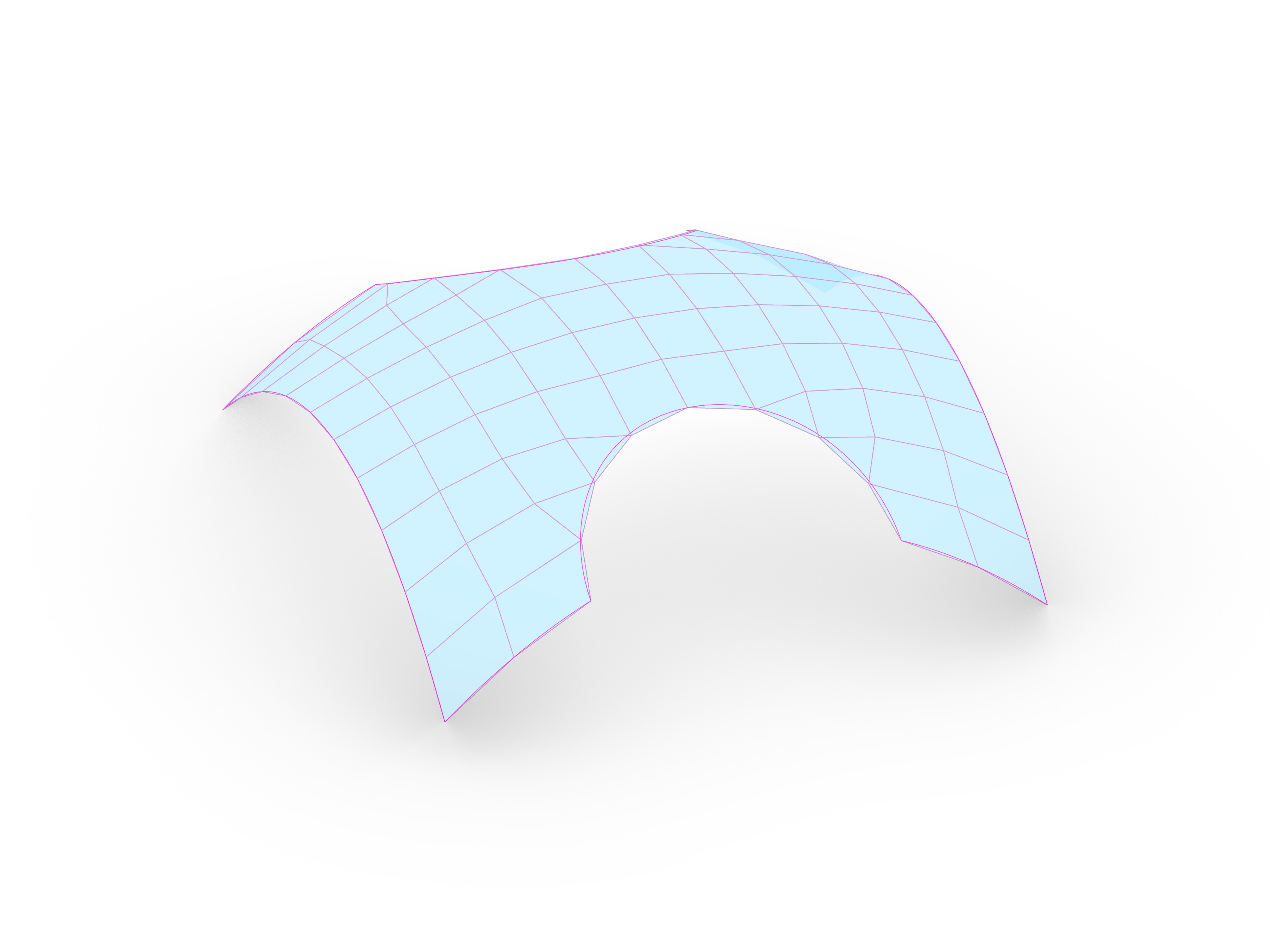
Mesh relaxation is an iterative process used to find an equilibrium state for a network of vertices and edges. It can be used in computational design for form-finding and optimization among others.
Core Concepts
The relaxation process is based on the interaction of internal and external forces acting on each vertex of the mesh.
-
Iterative Solvers: Instead of calculating the final shape in one step, we move vertices incrementally. In each “step” or “iteration,” we calculate the net force on a vertex and update its position.
- Spring Forces (Internal):
Every edge in the mesh acts like a spring.
- If an edge is longer than its target length, it pulls the connected vertices together.
- If it is shorter, it pushes them apart.
- Stiffness ($K$): Controls how strongly the spring reacts to the difference in length.
- Constraints (Boundary & Fixed):
To prevent the mesh from collapsing into a single point and to fixate support points, certain vertices must be constrained.
- Fixed Vertices: Vertices that cannot move (e.g., corner points).
- Boundary Constraints: Vertices allowed to move only along a specific path (e.g., a boundary curve or Brep edge).
- Damping:
To prevent the system from oscillating infinitely or “exploding” due to high forces, we apply a damping factor (e.g.,
0.95) to the movement, slowing down the vertices over time.
Implementation Logic
In our code, a MeshRelaxer object manages the simulation. The core logic of a single relaxation step can be summarized in three main actions:
# The Core Logic of a Relaxation Step
for _ in range(self.iterations):

    # 1. Calculate Forces (Internal + External)
    # Each vertex calculates a vector pulling it toward its neighbors or attractors
    for vertex in self.mesh.vertices():
        force = calculate_spring_forces(vertex) + calculate_attractor_forces(vertex)
        self.mesh.vertex_attribute(vertex, "force", force)

    # 2. Update Positions
    # Move vertices based on their accumulated forces
    for vertex in self.mesh.vertices():
        if not vertex_is_fixed:
            force = self.mesh.vertex_attribute(vertex, "force")
            new_pos = current_pos + force * damping
            self.mesh.vertex_attributes(vertex, "xyz", list(new_pos))

    # 3. Constrain to Surface (Optional)
    # Pull the updated positions back onto a target Brep or Mesh
    if self.snap_to_surface:
        project_vertices_to_surface()
Object-Oriented Modifiers
To make our relaxation system more modular, we move away from large, monolithic functions. We will implement Modifier Classes. We will create two main types of modifiers:
mesh_modifier: Changes the topology or fixed state of the mesh (e.g.,SnapVertexToPoint,MergeFaces).force_modifier: Adds vectors to the vertices’ force attribute (e.g.,AttractorPointModifier,DirectionalForce).
This architectural shift allows us to “plug and play” different behaviors without changing the core solver.
Assignment A02
Introduction to the next assignment, where you will implement these modifiers to create a sophisticated mesh relaxation tool.
Slides
↑ click to open ↑
Examples
The examples for this week can be found in the lectures/week-04/examples directory:
- Example 01: example-01-attractors.ghx
- Example 02: example-02-attractor-modifiers.ghx and example_02.py.
- Example 03: example-03-relax-visualisation.ghx
- Example 04: example-04-modifiers.ghx and example_04.py.