Auralise

Auralisation · Auralise
Auralise the room scene by convolving the impulse responses with the source signals. The signals keep the format of their impulse responses: mono (Simulate Mono), binaural (Simulate Binaural) or ambisonic (Simulate Ambisonics). Choose the level on the body: 'relative' (default) applies one gain to all signals of this run so the loudest peaks at -1 dBFS, keeping distance and level differences; 'individual' brings each signal to -1 dBFS; 'none' keeps the raw level and may clip. Save writes the signals as WAV files: choose a folder and a name (take.wav saves take_mic_0_0.wav, take_mic_0_1.wav, ...).
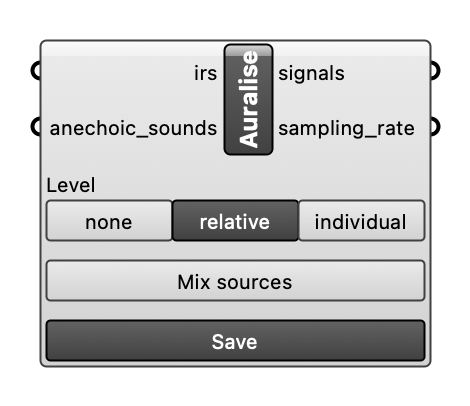
Inputs
| Name | Type | Access | Default | Description |
|---|---|---|---|---|
irs |
ghdoc | tree | ImpulseResponse object(s). Optional. | |
anechoic_sounds |
ghdoc | tree | Optional anechoic sound file(s), one per impulse response, paired by position in matching branches. If not provided, each impulse response uses the sound file of its Source. Optional. | |
mix_sources |
bool | item | If True, sum all sources heard at the same receiver into one signal per receiver (the full scene); their impulse responses must share one format. If False (default), output one signal per source and receiver. Optional. |
Outputs
| Name | Description |
|---|---|
signals |
Auralised signal(s) in the format of their impulse responses, shaped (samples, channels). The Audio Player plays mono (on both channels) and binaural; ambisonic signals are for saving. |
sampling_rate |
Sample rate of each auralised signal, in Hz. |