Simulate Binaural

Simulation · SimBin
Simulate binaural room impulse responses, an HRTF per path and per delay line: image sources, optional edge diffraction around obstacles and at the edges of the room's boundary that open wider than 180 deg, and a directional feedback delay network tail. Needs the worker (Python >= 3.11) and a closed room. Writes the responses to the impulse response graph under 'binaural'.
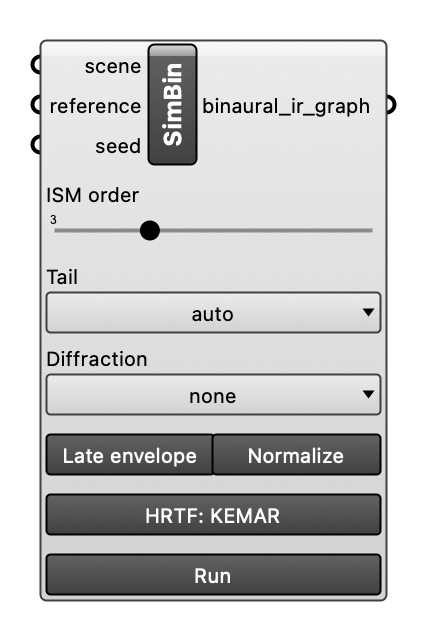
Inputs
| Name | Type | Access | Default | Description |
|---|---|---|---|---|
scene |
ghdoc | item | Room scene object. | |
tail |
str | item | Decay target of the tail: auto (reference if given, else ray_tracing), reference, ray_tracing (its own ray-traced reference), eyring or sabine (predicted, no simulation). Optional. | |
reference |
ghdoc | item | Optional reference for the tail: connect the mono_ir_graph output of Simulate Mono (the wire also makes Grasshopper run the ray tracing first). Optional. | |
ism_order |
int | item | 3 |
Highest image source order in the early field. Choices: 0, 1, 2, 3, 4, 5, 6, 7, 8, 9, 10. Optional. |
diffraction |
str | item | Edge diffraction around obstacles and at the edges of the room's boundary that open wider than 180 deg: none (default), udfa, or btms (slow). Optional. | |
late_envelope |
bool | item | Shape the late field: its level per band to the reference's late energy, and each delay line to its direction's share of the ray-traced energy (default True; off for an Eyring or Sabine tail). Optional. | |
seed |
int | item | Seed of the feedback matrices and delay jitter; the same seed gives Simulate Binaural and Simulate Ambisonics the same late field. Empty (default): a new random seed each run, shown in the component's message. A number: the same scene gives the same responses. Optional. | |
normalize |
bool | item | Whether the impulse responses are peak-normalized (default True). The raw level is always kept. Optional. | |
hrtf |
str | item | HRTF set of the binaural responses. Empty: KEMAR (default). Choose a .sofa file with the HRTF... button, or connect a File Path to one, which takes precedence; the component's message names the set in use. Optional. | |
run |
bool | item | Simulate when true: the body's Run button, or a Button or Boolean Toggle wired here. The simulation takes seconds to minutes and Grasshopper recomputes on every change of the inputs, so it starts only on a press; otherwise the responses of the last run for this scene are passed on. Optional. |
Outputs
| Name | Description |
|---|---|
binaural_ir_graph |
IR graph of the binaural responses (under 'binaural'), for Deconstruct IR Graph and Auralise. |