Simulate Mono

Simulation · SimMono
Simulate mono room impulse responses with pyroomacoustics: the image source method (ISM), plus ray tracing (RT) by default. The reference of Simulate Binaural and Simulate Ambisonics. Writes the responses to the impulse response graph under 'mono' and 'data'.
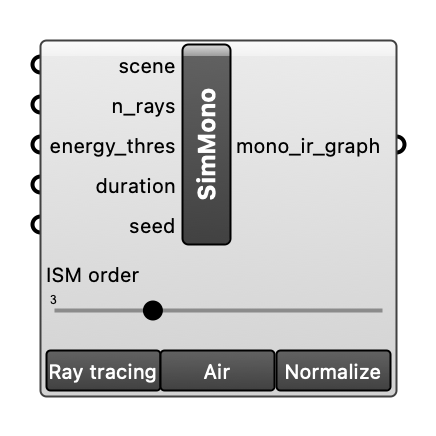
Inputs
| Name | Type | Access | Default | Description |
|---|---|---|---|---|
scene |
ghdoc | item | Room scene object. | |
ism_order |
int | item | 3 |
Highest image source (ISM) order. With ray tracing, the ray tracer takes over after it. Choices: 0, 1, 2, 3, 4, 5, 6, 7, 8, 9, 10. Optional. |
ray_tracing |
bool | item | Add ray tracing after the image sources (default True). Off: image sources only. Materials without scattering coefficients scatter 0.05. Optional. | |
n_rays |
int | item | 20000 |
Number of rays per source. Ray tracing only. Optional. |
absorb_air |
bool | item | Whether to consider air absorption (default True). Optional. | |
energy_thres |
float | item | 1e-07 |
Energy at which a ray is stopped (pyroomacoustics' own default). Ray tracing only. Optional. |
duration |
float | item | Length of the responses in seconds (default: 1.5 times the longest Eyring reverberation time, 0.5 to 12 s). Ray tracing only. Optional. | |
seed |
int | item | Random seed of the ray tracing. Empty (default): a new random seed each run, shown in the component's message. A number: the same scene gives the same responses, another number another draw. Ray tracing only. Optional. | |
normalize |
bool | item | Whether the impulse responses are peak-normalized (default True). The raw level is always kept and used for auralisation. Optional. |
Outputs
| Name | Description |
|---|---|
mono_ir_graph |
IR graph of the mono responses (under 'mono'), for Deconstruct IR Graph or the reference of Simulate Binaural and Simulate Ambisonics. |