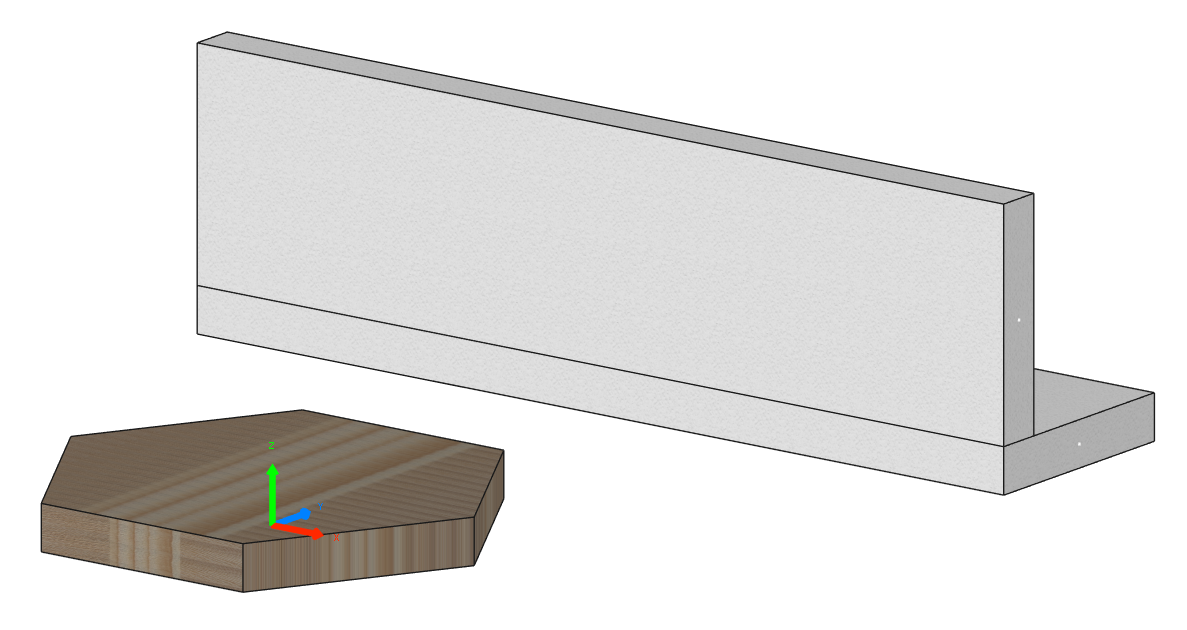
Panels Showcase¤
This simple example shows you how to work with panels and programmatically create them using the constructors of the Panel class.
from functools import lru_cache
from math import cos
from math import pi
from math import sin

from compas.geometry import Frame
from compas.geometry import Point
from compas.geometry import Polygon
from compas.geometry import Vector

from compas_cadwork.elements import Panel


@lru_cache
def create_hexagon_outline(radius: float) -> Polygon:
    points: list[Point] = []
    for i in range(6):
        angle = i * (2 * pi / 6)
        x = radius * cos(angle)
        y = radius * sin(angle)
        points.append(Point(x, y))
    return Polygon(points)


# Rectangular slab
rectangular_slab = Panel.rectangular(
    frame=Frame(Point(0, 0, 1000), Vector(1, 0, 0), Vector(0, 1, 0)),
    length=4000,
    width=1000,
    thickness=200,
)
rectangular_slab.name = "Rectangular slab"
print(rectangular_slab, rectangular_slab.frame)

# Rectangular panel
rectangular_panel = Panel.rectangular(
    frame=Frame(Point(0, -400, 1600), Vector(1, 0, 0), Vector(0, 0, 1)),
    length=4000,
    width=1000,
    thickness=200,
)
rectangular_panel.name = "Rectangular panel"
print(rectangular_panel, rectangular_panel.frame)

# Polygonal slab
hexagon_outline = create_hexagon_outline(1000)
polygonal_slab = Panel.polygonal(
    frame=Frame(Point(0, 0, 0), Vector(0, 0, 1), Vector(0, 1, 0)),
    outline=hexagon_outline,
    thickness=200,
)
polygonal_slab.name = "Polygonal slab"
print(polygonal_slab, polygonal_slab.frame)
If run successfully, you should get the following output in Cadwork 3d: